Posts

Showing posts with the label Computer Terms

Computer Terms

Backspace Key key that erases the word on the left side of the insertion point. Computer  is a useful device that needs electricity to run. It is an electronic device. Cursor  it is a blinking vertical line that tells that one can start typing a text. Delete Key  is the key that erases the words on the right side of the insertion point. Insert Mode  means that text added to a document without overwriting anything else. Language Bar is a bar used for speech and handwriting recognition. You can also find the handwriting button in this bar. Microsoft Word is a word processor that allows one quickly creates simple documents. XP  version is also known as MS Word version in 2002

LAN card

Image
A network card, network adapter or NIC (network interface card) is a piece of computer hardware designed to allow computers to communicate over a computer network. It is both an OSI layer 1 (physical layer) and layer 2 (data link layer) device, as it provides physical access to a networking medium and provides a low-level addressing system through the use of MAC addresses. It allows users to connect to each other either by using cables or wirelessly. Although other network technologies exist, Ethernet has achieved near-ubiquity since the mid- 1990s. Every Ethernet network card has a unique 48-bit serial number called a MAC address, which is stored in ROM carried on the card. Every computer on an Ethernet network must have a card with a unique MAC address. No two cards ever manufactured share the same address. This is accomplished by the Institute of Electrical and Electronics Engineers (IEEE), which is responsible for assigning unique MAC addresses to the vendors of...

System Unit

Image
The system unit is the core of a computer system. Usually it's a rectangular box placed on or underneath your desk.  Your computer's system unit probably has at least one floppy disk drive, and one CD or DVD drive, into which you can insert floppy disks and CDs.  Inside this box are many electronic components that process information. The most important of these components is the central processing unit (CPU) , or microprocessor, which acts as the "brain" of your computer. Another component is random access memory (RAM) , which temporarily stores information that the CPU uses while the computer is on. The information stored in RAM is erased when the computer is turned off. Almost every other part of your computer connects to the system unit using cables. The cables plug into specific ports (openings), typically on the back of the system unit. Hardware that is not part of the system unit is sometimes called a peripheral device or device .   Random Access M...

Computer Hardware

Image
Computer hardware is the collection of physical elements that constitutes a computer system. It referes to: Monitor Mouse Keyboard Computer Data Storage Hard drive disk (HDD) system unit Graphic Cards Sound Cards Memory MotherBoard Chips

Parts of Computer

Image
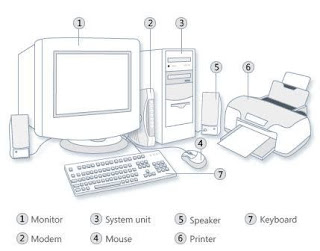
Monitor.   It is used for viewing letters, numbers and graphics. Computer monitors come in different sizes and thickness.  Modem System Unit. It is the "brain" of the computer because this is where data are processed. Parts of System Unit CD-Rom. This is where a CD / DVD Rom is located CD / DVD DRIVE. This is where a CD / DVD is inserted RESET BUTTON. It is used to restart the computer ON / OFF BUTTON. It is used to open or close the computer USB PORT.  This is where the USB is attached. Operation of the System Unit The system unit is used to switch the computer on  and off . You should switch a computer to the "on and off" button properly to make sure that there will be no problem on the file you made. To switch on t he computer, follow the steps below. Make sure the computer is plugged Push the power switch Press the power button on the monitor Wait until the desktop appears. To switch off a computer, follow the steps below. On the d...

Computer

What is a Computer? A computer  is a useful device that needs electricity to run. It is an electronic device Kinds of Computer Personal Computer Laptop Palmtop Super Computers Ipod Ipad Tablets What a Computer Can Do? A computer can do many things to help work easier. A computer helps us to type words and numbers. A computer help us to compute A computer helps us to Draw and Paint objects A computer helps us to  Play Games A computer can  Store Information  A computer helps us to Search for Information A computer allows us to listen to music. A computer allows us to watch movies. What a Computer Cannot Do? A computer cannot create information. A computer needs its user to input information. Without you, it cannot function. A computer cannot correct the wrong information that is fed to it. When you input wrong information, the computer will also give wrong data. This is called garbage in-garbage out . A computer cannot work with...